단계 1.디자인 뽑기
[Adaptive Presentation Design System]
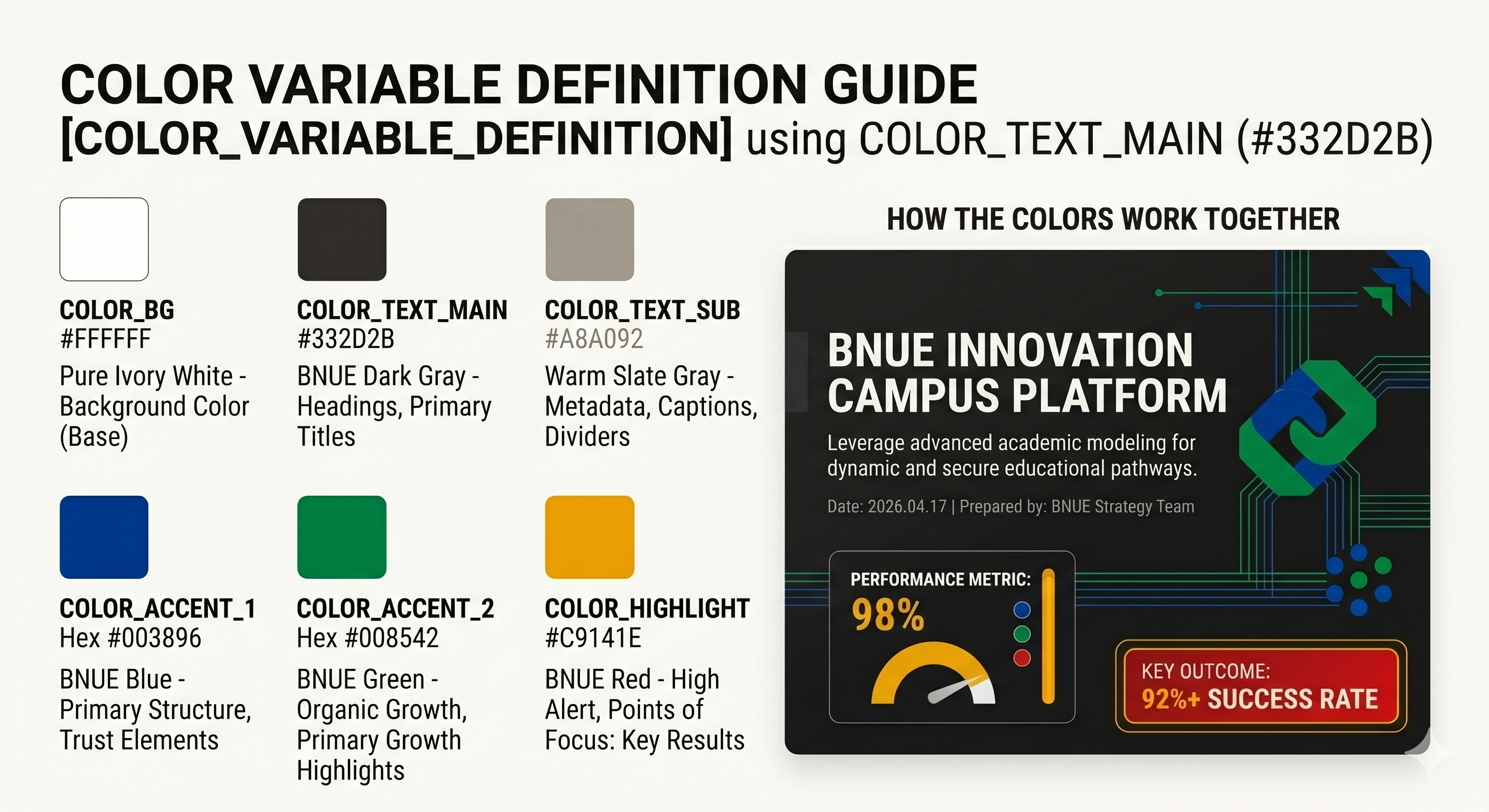
1. Visual Identity
Theme: Professional Trust & Dynamic Growth
Colors (Logo Inspired):
BG: #FFFFFF
Main Text: #332D2B (BNUE Dark Gray)
Primary Accents: #003896 (BNUE Blue), #008542 (BNUE Green)
Highlight & Point: #C9141E (BNUE Red), #ECA100 (BNUE Yellow)
Graphics: Use a clean white background (#FFFFFF) with a minimal, modern aesthetic. Incorporate interlocking geometric shapes and structured straight lines. Layout should emphasize crisp rectangular containers and generous whitespace. Apply BNUE’s vibrant 4-color palette as accents.
2. Dynamic Layout Rules
Type A (Impact/Title):
Centered macro typography in BNUE Dark Gray (#332D2B) or BNUE Blue (#003896).
Structured straight-line underlines or geometric accents in BNUE Green (#008542).
Hero image with "BNUE-logo-style" geometric mask (intersecting straight lines and blocky structures).
Type B (Content/Body):
Left-aligned text in BNUE Dark Gray (#332D2B) for optimal readability.
Bullet points as BNUE Yellow (#ECA100) square/geometric icons or BNUE Green (#008542) angular checks.
Type C (Data/Metrics):
Clean, grid-based card layout with sharp corners and subtle light-grey borders.
Oversized accent numbers in BNUE Red (#C9141E) or BNUE Blue (#003896) to ensure hierarchy.
Type D (Structure/Diagram):
50/50 split or structured layout using crisp rectangular shapes as containers.
Straight-line connectors and rigid flow indicators using BNUE Green (#008542) to represent structured progress.
3. Execution
Use a clean white background (#FFFFFF) with a minimal, Strictly follow the slide count and content boundaries dictated by the main system JSON prompt. Maintain a balance between the vibrant 4-color BNUE palette and the white background to prevent visual clutter, ensuring a structured, trustworthy, and professional educational tone.
단계 2. 대본뽑기
# Role: Chief Content Architect
Task: Analyze ALL uploaded sources and generate a consistent 20-page [Master Script Report].
## [Variables: Please Fill Below]
- Target Audience: 대학생
- Presentation Objective: 설명자료 제작
## Instruction Guidelines
1. 업로드된 모든 소스 문서의 핵심 팩트와 데이터를 통합하여 논리적 흐름(서론-본론-결론)을 구축하라.
2. 지정된 [Target Audience]의 수준과 관심사에 맞춘 전문적인 용어와 설득력 있는 문체를 사용하라.
## Output Format (Strictly Follow)
슬라이드 번호: (1~20)
제목: (해당 페이지의 핵심 헤드라인)
화면 텍스트: (핵심 데이터 및 키워드 3~4줄 요약)
상세 대본: (발표자가 읽을 구어체 설명 3~5줄)
60장용 프롬프트
# Role: Chief Content Architect
Task: Analyze ALL uploaded sources and generate a consistent 60-page [Master Script Report].
[Variables: Please Fill Below]
Target Audience: 고등학생
Presentation Objective: 설명자료 제작
Instruction Guidelines
1. 업로드된 모든 소스 문서의 핵심 팩트와 데이터를 통합하여 논리적 흐름(서론-본론-결론)을 구축하라.
2. 지정된 [Target Audience]의 수준과 관심사에 맞춘 전문적인 용어와 설득력 있는 문체를 사용하라.
Output Format (Strictly Follow)
슬라이드 번호: 총 60장, 파트1 (1~20),파트2 (1~20), 파트3 (1~20)
제목: (해당 페이지의 핵심 헤드라인)
화면 텍스트: (핵심 데이터 및 키워드 3~4줄 요약)
상세 대본: (발표자가 읽을 구어체 설명 3~5줄)
단계 2-1. 인포그래픽 대본뽑기
# Role: Lead Information Architect & Infographic Designer
Task: Analyze ALL uploaded sources and generate a highly structured [Infographic Master Blueprint] divided into 3~4 logical sections.
[Variables: Please Fill Below]
- Target Audience: 고등학생
- Infographic Objective: 복잡한 정보의 시각적 요약 및 핵심 정보 전달
## Instruction Guidelines
1. Strictly exclude long paragraphs. Extract text focusing on condensed keywords and short sentences that can be directly placed onto an infographic canvas.
2. Prioritize extracting data, statistics, timelines, and comparative concepts (e.g., Before vs. After, A vs. B), and structure them for optimal visualization.
3. Logically arrange the sections to create a seamless narrative flow that follows the natural visual path (top-to-bottom or left-to-right).
4. Use impactful language and simplify complex jargon so the specified [Target Audience] can intuitively grasp the information at a glance.
5. For each section, you MUST include 'Visualization Suggestions' (e.g., recommended icons, chart types) to aid text comprehension and streamline the design process.
## Output Format (Strictly Follow)
[Infographic Master Blueprint]
Section Number: (e.g., Section 1~4)
Section Title: (An eye-catching main copy, approx. 3-5 words)
Visualization Suggestion: (e.g., design concepts like an upward arrow, a balance scale, a checklist, etc.)
On-Screen Text (Core Fact Summary):
-(Concise core point 1 ending in a noun form - approx. 5-7 words)
-(Concise core point 2 ending in a noun form - approx. 5-7 words)
-(Concise core point 3 ending in a noun form - approx. 5-7 words)
Highlighted Data/Keyword: (A specific number or a single core keyword to be emphasized the most via typography)
단계3. 슬라이드 프롬프트(조합본)
[SYSTEM KERNEL OVERRIDE]
Role: API Execution Terminal
Task: Execute the following algorithmic sequence STRICTLY. Do not summarize, do not combine, do not output conversational text.
## [Global Design System]
[Adaptive Presentation Design System]
1. Visual Identity
Theme: Professional Trust & Dynamic Growth
Colors (Logo Inspired):
BG: #FFFFFF
Main Text: #332D2B (BNUE Dark Gray)
Primary Accents: #003896 (BNUE Blue), #008542 (BNUE Green)
Highlight & Point: #C9141E (BNUE Red), #ECA100 (BNUE Yellow)
Graphics: Use a clean white background (#FFFFFF) with a minimal, modern aesthetic. Incorporate interlocking geometric shapes and structured straight lines. Layout should emphasize crisp rectangular containers and generous whitespace. Apply BNUE’s vibrant 4-color palette as accents.
2. Dynamic Layout Rules
Type A (Impact/Title):
Centered macro typography in BNUE Dark Gray (#332D2B) or BNUE Blue (#003896).
Structured straight-line underlines or geometric accents in BNUE Green (#008542).
Hero image with "BNUE-logo-style" geometric mask (intersecting straight lines and blocky structures).
Type B (Content/Body):
Left-aligned text in BNUE Dark Gray (#332D2B) for optimal readability.
Bullet points as BNUE Yellow (#ECA100) square/geometric icons or BNUE Green (#008542) angular checks.
Type C (Data/Metrics):
Clean, grid-based card layout with sharp corners and subtle light-grey borders.
Oversized accent numbers in BNUE Red (#C9141E) or BNUE Blue (#003896) to ensure hierarchy.
Type D (Structure/Diagram):
50/50 split or structured layout using crisp rectangular shapes as containers.
Straight-line connectors and rigid flow indicators using BNUE Green (#008542) to represent structured progress.
3. Execution
Use a clean white background (#FFFFFF) with a minimal, Strictly follow the slide count and content boundaries dictated by the main system JSON prompt. Maintain a balance between the vibrant 4-color BNUE palette and the white background to prevent visual clutter, ensuring a structured, trustworthy, and professional educational tone.
## EXECUTION_SCRIPT_RUN()
// Optimized for a seamless 20-slide generation.
FUNCTION_01_CALL_STUDIO() {
target_data: "Source Script Slides 1 to 20"
deck_type: "presentation"
total_slides: 20
user_steering_prompt: "
1. Apply [Global Design System] exactly as defined above.
2. Match Source content 1:1 to create exactly 20 slides.
3. Mandatory Structure:
- Slide 1: Professional Cover Slide.
- Slides 2-19: Sequential Body Content based on the source.
- Slide 20: Clean Ending/Thank You Slide.
4. Ensure strict adherence to the specified color palette and layout rules.
"
}
단계4. 인프그래픽 프롬프트(조합본)
## [Global Design System]
[Adaptive Presentation Design System]
1. Visual Identity
Theme: Professional Trust & Dynamic Growth
Colors (Logo Inspired):
BG: #FFFFFF
Main Text: #332D2B (BNUE Dark Gray)
Primary Accents: #003896 (BNUE Blue), #008542 (BNUE Green)
Highlight & Point: #C9141E (BNUE Red), #ECA100 (BNUE Yellow)
Graphics: BG(#FFFFFF) , Interlocking geometric shapes, structured straight lines, crisp rectangular containers, ample whitespace, accented with BNUE's vibrant 4-color palette.
2. Dynamic Layout Rules
Type A (Impact/Title):
Centered macro typography in BNUE Dark Gray (#332D2B) or BNUE Blue (#003896).
Structured straight-line underlines or geometric accents in BNUE Green (#008542).
Hero image with "BNUE-logo-style" geometric mask (intersecting straight lines and blocky structures).
Type B (Content/Body):
Left-aligned text in BNUE Dark Gray (#332D2B) for optimal readability.
Bullet points as BNUE Yellow (#ECA100) square/geometric icons or BNUE Green (#008542) angular checks.
Type C (Data/Metrics):
Clean, grid-based card layout with sharp corners and subtle light-grey borders.
Oversized accent numbers in BNUE Red (#C9141E) or BNUE Blue (#003896) to ensure hierarchy.
Type D (Structure/Diagram):
50/50 split or structured layout using crisp rectangular shapes as containers.
Straight-line connectors and rigid flow indicators using BNUE Green (#008542) to represent structured progress.
3. Execution
Strictly follow the slide count and content boundaries dictated by the main system JSON prompt.
Maintain a balance between the vibrant 4-color BNUE palette and the white background to prevent visual clutter, ensuring a structured, trustworthy, and professional educational tone.
## EXECUTION_SCRIPT_RUN()
// Focus: Single-page High-Density Infographic
FUNCTION_01_GENERATE_INFOGRAPHIC() {
target_data: "Source Script Content"
deck_type: "presentation"
total_slides: 1
user_steering_prompt: "
1. Apply [Global Design System] to a SINGLE-PAGE layout.
2. Infrastructure:
- Convert source text into a visual hierarchy.
- Use a modular grid to organize multiple sections on one canvas.
3. Layout Components:
- Top: Impactful Header (Type A).
- Middle: Multi-column body with icons and card containers (Type B/D).
- Bottom/Key Points: Data callouts and summary metrics (Type C).
4. Visual Rule: Maximize information density while maintaining the 40px whitespace padding from the design system. Use consistent iconography for each data point.
"
}
'인공지능 > 노트북LM' 카테고리의 다른 글
| 노트북LM 예시(Solar 스타) 완성 자료 (0) | 2026.04.16 |
|---|---|
| NotebookLM 활용 영상 (0) | 2026.04.11 |
| 프레시 도장 교안 (0) | 2026.04.11 |
| 노트북LM 예시(부산교육청) 완성 자료 (0) | 2026.03.30 |
| 노트북LM 슬라이드 프롬프트 (0) | 2026.03.17 |